

Translate WPDirectoryKit with TranslatePress
WordPress plugin “TranslatePress” is great for automatic and also allow manual translations.
TranslatePress allows you to translate the strings of text that are hardcoded into your website’s code, such as buttons, labels, and other interface elements and is tested with WP Directory Kit.
(more…)How to use Mortgage / Loan Calculator
Requirements: You need to have “WP Directory Kit” plugin installed: https://www.wpdirectorykit.com/plugins/wpdirectorykit.html
1. you can buy it here: https://www.wpdirectorykit.com/plugins/wp-directory-mortgage-loan-calculator.html
2. In Elementor Edit your Listing Preview page
3. Drag “Wdk Morgage Calculator” element to wanted position on layout:
(more…)Bad resolution/map detail when using open street maps
Some clients experienced such issues when using custom map styles on our WordPress Directory Solution, thats caused actually by this bad quality custom map styles so remove it or use some other
(more…)
Integrate third parity iframe on listing page
When you edit listing preview page in elementor, you can use HTML element like this:
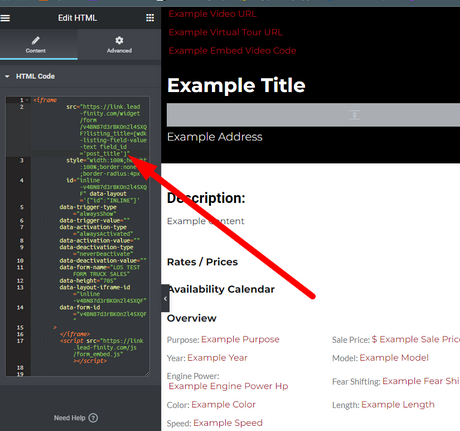
Also you can use some shortcode for example to prepopulate or add custom data into such code related to listing, example also above so with code: [wdk-listing-field-value-text field_id=’post_title’] you can add listing title into this iframe form, this is example from gohighlevel crm https://www.gohighlevel.com/ contact form
Shortcode section in docs: https://www.wpdirectorykit.com/documentation/#!/shortcodes
How to customize search form in Directory Kit Listings Management Dashboard?
Required code customization in plugin. Here providing example with field 5:
(more…)What limit images from showing on listing or other pages?
By default all widgets on listings preview page have limit 10 images
(more…) Knowledge Base
Directory Kit Membership and Woocommerce
Membership addon you can purchase on our website:
https://wpdirectorykit.com/plugins/wp-directory-membership.html
(more…)