

 ਖ਼ਬਰਾਂ
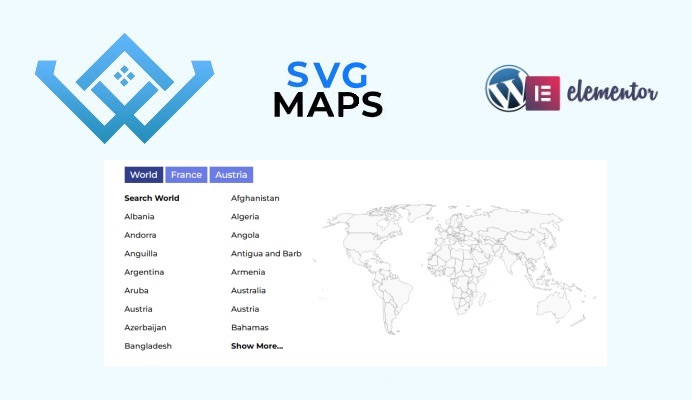
SVG ਨਕਸ਼ੇ ਵਰਡਪ੍ਰੈਸ ਡਾਇਰੈਕਟਰੀ ਪਲੱਗਇਨ
ਕੁਝ ਹਫ਼ਤੇ ਪਹਿਲਾਂ ਅਸੀਂ ਤੁਹਾਡੇ ਰੀਅਲ ਅਸਟੇਟ, ਵਰਗੀਕ੍ਰਿਤ ਇਸ਼ਤਿਹਾਰਾਂ, ਵਪਾਰਕ ਡਾਇਰੈਕਟਰੀ ਜਾਂ ਕਿਸੇ ਹੋਰ ਡਾਇਰੈਕਟਰੀ ਵੈੱਬਸਾਈਟ 'ਤੇ SVG ਨਕਸ਼ੇ ਦਿਖਾਉਣ ਲਈ ਵਰਡਪ੍ਰੈਸ ਪਲੱਗਇਨ ਬਣਾਇਆ ਹੈ।.
ਤੁਸੀਂ ਲੋੜੀਂਦੇ ਨਕਸ਼ੇ ਆਯਾਤ ਕਰ ਸਕਦੇ ਹੋ। ਪਲੱਗਇਨ ਇੱਕੋ ਸਮੇਂ ਕਈ ਨਕਸ਼ਿਆਂ, ਸਬਮੈਪ ਖੋਜ ਲਿੰਕਾਂ ਅਤੇ ਹੋਰ ਪ੍ਰਸਿੱਧ ਵਿਸ਼ੇਸ਼ਤਾਵਾਂ ਦਾ ਸਮਰਥਨ ਕਰਦਾ ਹੈ।.
ਤੁਹਾਡੀ ਵਰਡਪ੍ਰੈਸ ਡਾਇਰੈਕਟਰੀ ਵੈੱਬਸਾਈਟ 'ਤੇ SVG ਨਕਸ਼ਿਆਂ ਦੀ ਵਰਤੋਂ ਕਰਨ ਲਈ WP ਡਾਇਰੈਕਟਰੀ ਕਿੱਟ ਪਲੱਗਇਨ ਦੀ ਲੋੜ ਹੁੰਦੀ ਹੈ।.
ਪਲੱਗਇਨ ਦਾ ਲਿੰਕ: https://wpdirectorykit.com/plugins/wp-directory-svg-map.html
SVG ਮੈਪਸ ਵਰਡਪ੍ਰੈਸ ਪਲੱਗਇਨ ਦੀ ਵਰਤੋਂ ਕਿਵੇਂ ਕਰੀਏ?
- ਤੁਹਾਡੇ ਕੋਲ WP ਡਾਇਰੈਕਟਰੀ ਕਿੱਟ ਪਲੱਗਇਨ ਸਥਾਪਤ ਹੋਣਾ ਚਾਹੀਦਾ ਹੈ।
- ਸਾਡੇ ਵਰਡਪ੍ਰੈਸ ਪ੍ਰੀਮੀਅਮ ਪਲੱਗਇਨ ਜਾਂ ਸਾਰੀਆਂ ਪ੍ਰੀਮੀਅਮ ਵਿਸ਼ੇਸ਼ਤਾਵਾਂ ਦੇ ਨਾਲ ਗਾਹਕੀ ਇੱਥੋਂ ਖਰੀਦੋ: https://wpdirectorykit.com/plugins/wp-directory-svg-map.html
- ਇਸਨੂੰ ਐਡਮਿਨ->ਪਲੱਗਇਨ->ਨਵਾਂ ਸ਼ਾਮਲ ਕਰੋ ਵਿੱਚ ਸਥਾਪਿਤ ਕਰੋ।
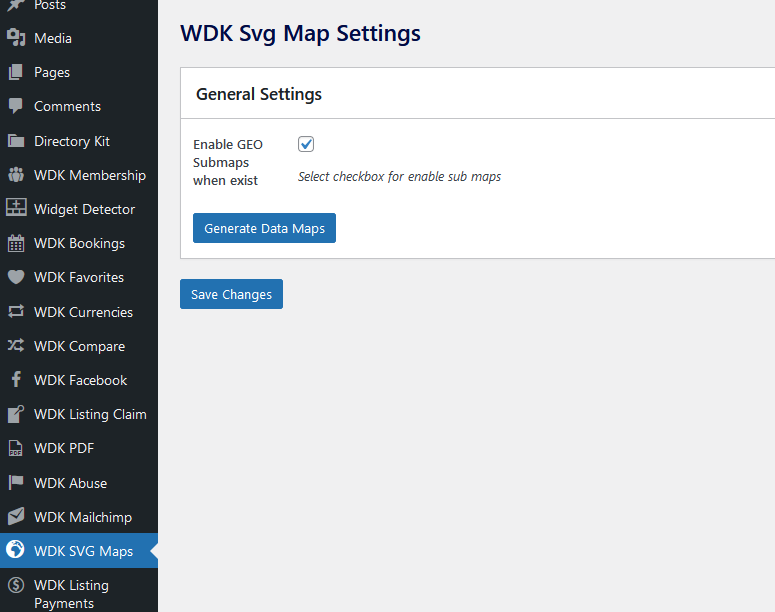
- ਤੁਸੀਂ ਇੱਥੇ ਸੈਟਿੰਗਾਂ ਨੂੰ ਸੋਧਣ ਦੇ ਯੋਗ ਹੋਵੋਗੇ:
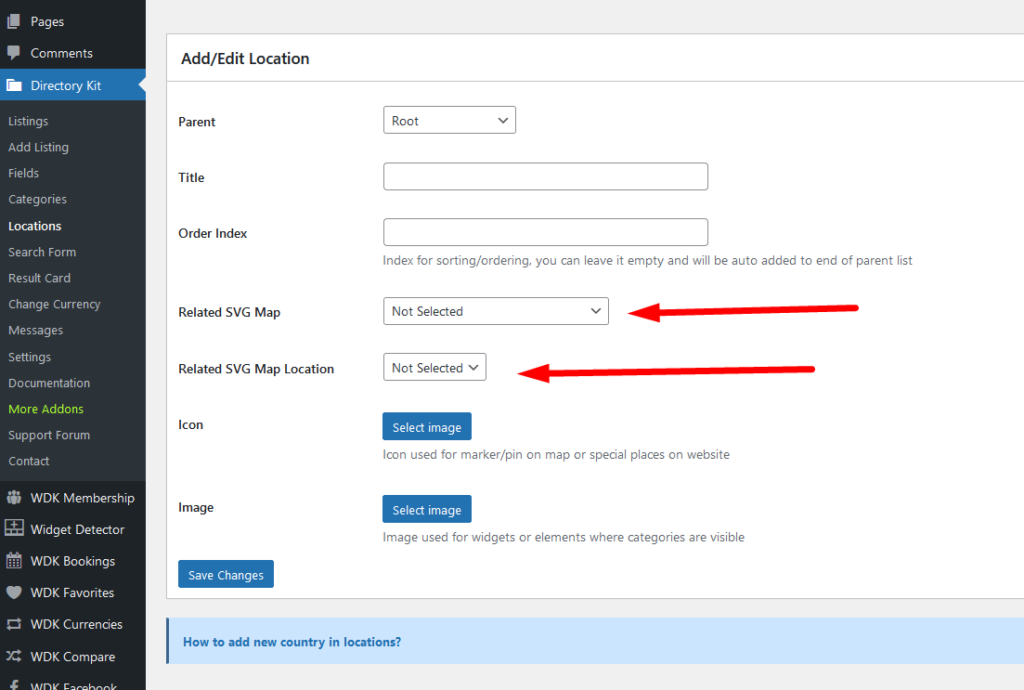
5. ਆਮ ਸਥਾਨ ਜੋ ਤੁਸੀਂ ਐਡਮਿਨ->ਡਾਇਰੈਕਟਰੀ ਕਿੱਟ->ਲੋਕੇਸ਼ਨਾਂ ਵਿੱਚ ਪ੍ਰਬੰਧਿਤ ਕਰ ਸਕਦੇ ਹੋ ਅਤੇ ਹੁਣ ਤੁਹਾਨੂੰ ਉੱਥੇ ਇਹ ਨਵੇਂ ਵਿਕਲਪ ਮਿਲਣਗੇ, ਉਦਾਹਰਣ ਵਜੋਂ ਜੇਕਰ ਤੁਹਾਡੇ ਕੋਲ ਜਰਮਨੀ ਵਿੱਚ ਬਰਲਿਨ ਹੈ, ਤਾਂ ਤੁਸੀਂ SVG ਮੈਪ "ਜਰਮਨੀ" ਦੀ ਚੋਣ ਕਰੋਗੇ ਅਤੇ ਸਥਾਨ ਵਜੋਂ ਤੁਸੀਂ ਬਰਲਿਨ ਦੀ ਚੋਣ ਕਰੋਗੇ।
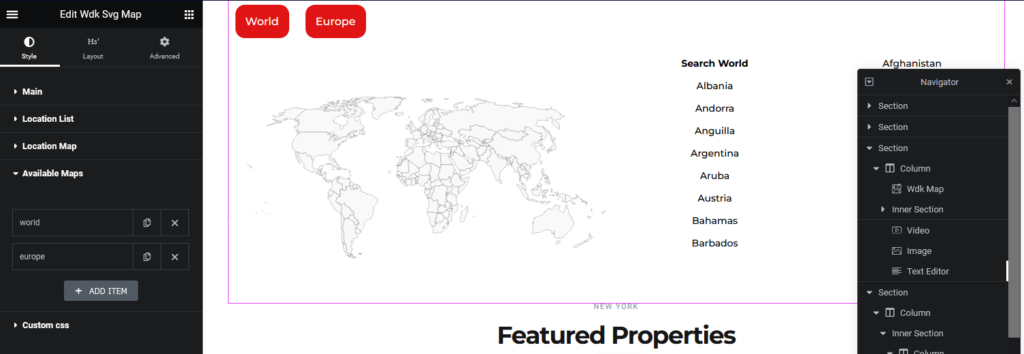
6. ਐਲੀਮੈਂਟਰ ਐਡੀਟਰ ਦੇ ਅੰਦਰ ਹੁਣ ਤੁਸੀਂ WDK SVG ਮੈਪ ਐਲੀਮੈਂਟ ਦੀ ਵਰਤੋਂ ਕਰ ਸਕਦੇ ਹੋ, ਇਸ ਐਲੀਮੈਂਟ ਦੇ ਅੰਦਰ ਤੁਹਾਨੂੰ ਬਹੁਤ ਸਾਰੇ svg ਵਿਕਲਪ ਮਿਲਣਗੇ ਜਿਸ ਵਿੱਚ ਕਿਹੜੇ ਨਕਸ਼ੇ ਦਿਖਾਉਣੇ ਹਨ ਅਤੇ ਹੋਰ ਸਟਾਈਲਿੰਗ ਵਿਕਲਪ ਸ਼ਾਮਲ ਹਨ:
ਕਿਸੇ ਵੀ ਮੁਸੀਬਤ 'ਤੇ ਸਾਡੀ ਸਹਾਇਤਾ ਟੀਮ ਤੁਹਾਡੀ ਮਦਦ ਕਰਨ ਲਈ ਹਮੇਸ਼ਾ ਖੁਸ਼ ਹੋਵੇਗੀ!
ਤੁਸੀਂ ਸਾਡੇ ਨਾਲ ਇੱਥੇ ਸੰਪਰਕ ਕਰ ਸਕਦੇ ਹੋ: https://wpdirectorykit.com/contact.html